You spent time finding the item, taking pictures, and writing the listing. Then you check back and see hardly any views. Before you lower the price or start ending listings, work through one listing and look for a specific problem you can fix.
Start with the view count, then check your title, item details, main photo, and pricing evidence. A low number alone does not tell you which change will help.
Start here: can buyers find and buy the listing?
Before changing the photos or price, check the listing in Seller Hub. Is it active, rather than a draft, scheduled, or ended? Open it and confirm the item or variation is available to buy. Look for any messages from eBay about listing restrictions or removals.
eBay says new listings should appear in search within 24 hours. If yours is newer, allow for that delay. If it has been longer, search using identifying words from the title and suitable filters, then follow eBay’s finding-your-listing checks. [5]
RTL’s suggestion: If an active listing remains missing after those checks, contact eBay before paying for promotion or repeatedly recreating it. RTL can review listing quality, but cannot remove an account restriction or repair an eBay technical problem.
Are buyers not seeing it—or not opening it?
If your traffic report provides impressions, compare them with views for the same listing and period:
| What you see | Where to start |
|---|---|
| Few impressions and few views | Listing status, buyer demand, title, category, and item specifics |
| Impressions but few views | Main photo, identifying details, and buyer total compared with competing listings |
| Views but no sales | Condition information, pricing evidence, shipping, and reasons a buyer might hesitate |
This is RTL’s starting point for investigation, not a diagnosis. There is no single good view count for every item. A specialized replacement part and a popular pair of shoes serve different buyers.
If you only have the view count, work through the checks below. You do not need to guess at missing traffic data.
Understand the number you’re looking at
A page view means someone opened your listing. It does not mean a sale, and it is different from an impression, where a listing appears in a placement such as search results.
For fixed-price listings older than 30 days, eBay’s displayed view count covers a rolling 30-day period. It is not a lifetime total. Older views drop out of that window, and eBay’s bot filtering can also reduce the number. You can check the listing’s traffic history for a longer view. [1]
A listing can even have watchers without a matching number of views: eBay allows buyers to watch directly from search results. Watchers are worth noticing, but they do not prove the price is right. [1]
RTL’s suggestion: Compare the same reporting periods. A listing posted yesterday and a listing active for a month have not had the same opportunity to attract buyers.
Check whether your title describes what a buyer wants
Does the title identify the actual item, or mainly say how much you like it?
Here is an illustrative rewrite for a shirt:
- Before: “Great Shirt Nice Condition Must See”
- After: “Columbia PFG Men’s Large Blue Short Sleeve Button Front Fishing Shirt”
Use those details only if they are accurate for your item. A model name, size, or material should come from the item or its label—not a guess.
This is an RTL example, not a measured before-and-after sales result.
Check the category and item specifics
eBay recommends accurate titles, a suitable category, and complete listing details. Its search system considers relevance as well as price, listing quality, selling terms, and seller history. There is no single setting that guarantees a sale. [2]
Look at fields such as brand, size, model, and color. eBay explains that item specifics help match listings to buyer searches and filters. Fill in applicable details you can verify. [3]
RTL’s suggestion: Check that the title, photos, description, and selected fields agree. If the title says size large but the size field says medium, correct that mismatch before testing anything else.
Look at the main photo at phone size
Open your listing beside a few genuinely similar items. Make the pictures small enough to resemble the view on a phone.
Can you tell what your item is without opening the listing? Does the background distract from the item? Is a dark part of the product disappearing into shadow?
eBay recommends clear photos that show the item and its flaws, without added text or borders. [2]
RTL’s suggestion: If your item is hard to recognize in the small picture, try a clearer main photo. Keep the full set of detail and condition photos in the listing.
Check the price with evidence
Low views are a reason to investigate, not an automatic instruction to cut your price.
Compare similar sold items as well as current competition. eBay provides completed-listing research to help with pricing. [4]
For a useful comparison, look at the model, condition, size or quantity, and what is included. Compare item price plus shipping rather than the item price alone.
For example, a $25 item with $12 shipping costs the buyer more before tax than a $32 item with free shipping. That arithmetic does not prove either listing is fairly priced; it simply makes the comparison clearer.
If you cannot find a close sold comparison, say the evidence is limited. A weak comparison should not become a confident price recommendation.
Choose one useful next step
Start with the clearest issue you found. Correct wrong information immediately. For other changes, keep a short note of what you changed and when, so you can review what happened afterward.
| What you found | A practical next step |
|---|---|
| Wrong size, category, or model | Correct the inaccurate detail |
| Title leaves out useful identifying information | Rewrite it using verified details |
| Main photo is difficult to understand | Try a clearer image of the actual item |
| Comparable sold prices suggest your buyer total is high | Consider a price test that still works for your costs |
| No clear issue or reliable comparison | Gather more evidence before making a large change |
This is RTL’s suggested review order, not an eBay rule or a promise of more views. Avoid changing several things just to feel busy. The aim is to make a useful improvement you can explain.
Want a checklist to work through?
Get the free Quick eBay Listing Checkup. It helps you review six parts of an active listing and choose a practical next step. Enter your email on the RTL website to receive the PDF and RTL email updates; you can unsubscribe anytime.
Not sure which problem applies to your listings?
You may recognize several of these issues and still be unsure where to start. That is where the RTL 50-Item eBay Review can help.
We review 50 active listings and give you a written action plan: what to work on first, what can wait, and what is already working well when the evidence supports that conclusion. You make the changes; we do not edit your store.
The review costs $100 and includes up to 10 sold-price reviews when suitable sold information is available.
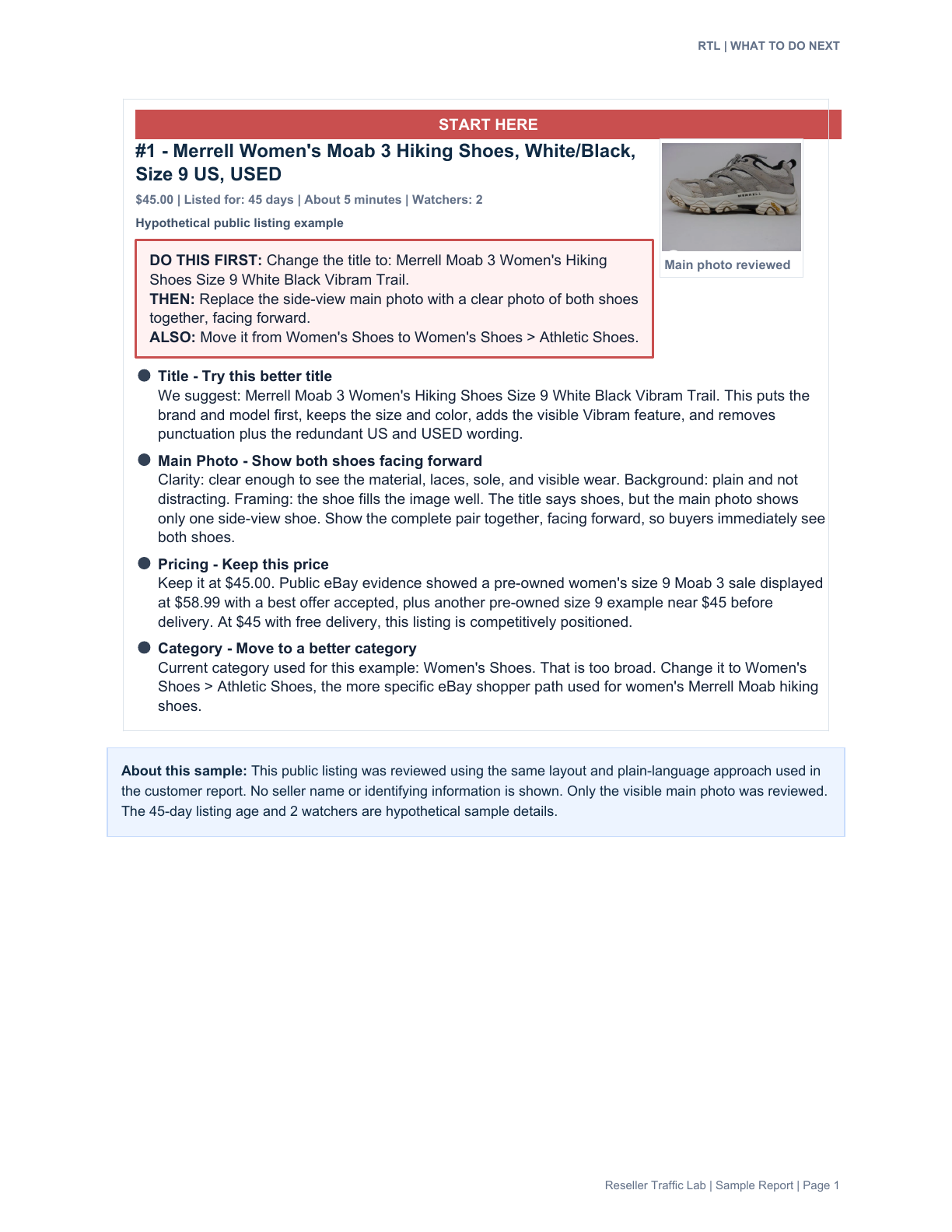
See a sample RTL review page to judge whether the detail would help you. The sample includes hypothetical listing-age and watcher details. It uses a public shoe listing in the report format customers receive, with seller-identifying information removed. It illustrates the advice, not a promised sales result.
Getting started takes about 10–15 minutes to complete your questionnaire and send your reports. You do not need to share your eBay password.
See what’s included in the 50-item review.
eBay References
Official guidance checked September 14, 2026. The examples and suggested review order above are RTL’s own recommendations. Reseller Traffic Lab is independent of eBay.